Highlights
Annotate web and easily revisit key passages in the future


Raindrop should cover all your daily bookmarking needs. This is our goal right from the beginning. And today we are taking a big step in this direction.
Now you can easily highlight and revisit the most valuable parts of a web page, such as 💬 quotes, 💶 prices, 🧑💻 code blocks, etc. Leave instant thoughts, set a specific color, and export to other apps.
Available in all our apps and extensions. You can add unlimited highlights for free. Annotations are only available in Pro plan.
Create a highlight
Creating a highlight is as simple as selecting text. When you highlight a passage, the text background will turn 🟡 yellow so it stands out from the rest of the page.
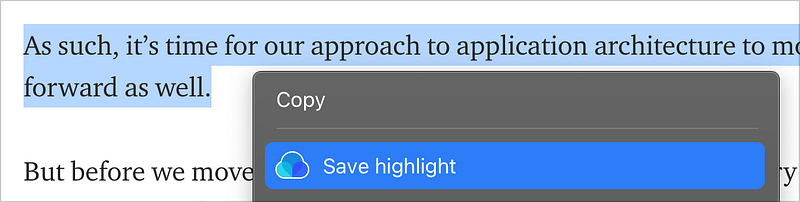
The easiest way is to use our browser extension. Just click & drag your mouse across the text that you would like to highlight and press ⌨️ Ctrl+Shift+S (or Cmd+Shift+S on a Mac) or select Save highlight from the context menu.
View, manage & export highlights
Next time you visit the same page all the highlights will be loaded automatically. Change color, annotate, add or remove highlights in place.
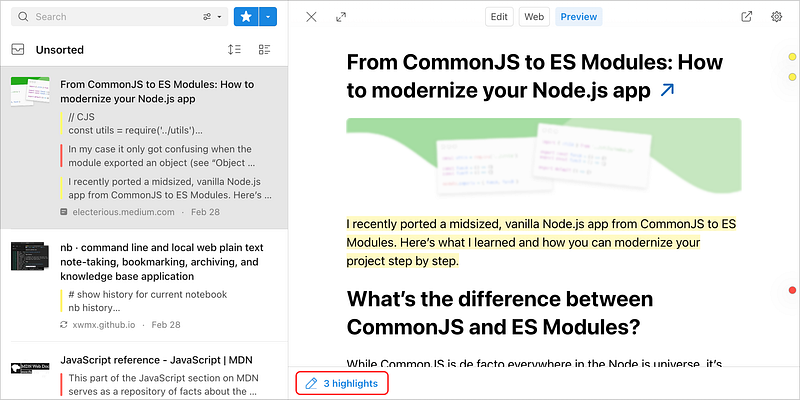
Open the app or extension to view all the highlights from the page. Here you can copy or export them in CSV or Text format.
Search highlights & annotations
Highlights and annotations are indexed to search for specific words or phrases.
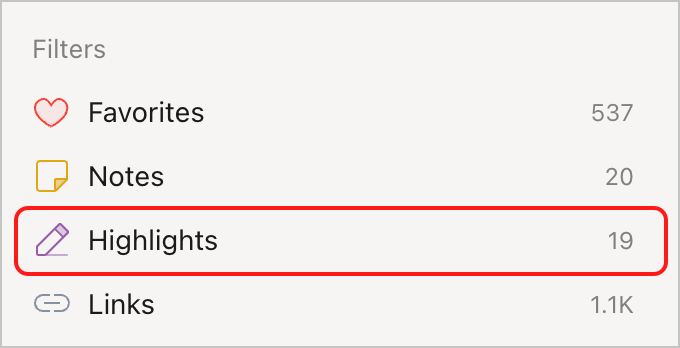
In addition, you can apply the Highlights filter to see all of your highlights across all of your bookmarks in one place.
Integrations
Using our IFTTT integration you can send new highlights to many third-party services.
The team behind Readwise made a promise to add Raindrop as their native integration sometime in the future.
Limitations
- PDF files not supported yet
- Not possible to filter by color yet